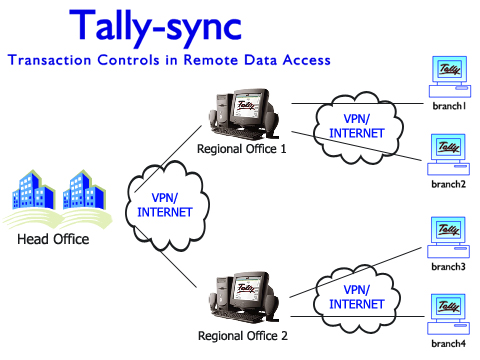



synchronization
we make tally according to our customers need
SOLUTIONS Endless Possibilities.... Shaurya Info Solutions Provides
Best performance in Synchronization. Synchronization is
the process of replicating data between two or more computers using
Tally.ERP 9 in a Client Server environment. Data is transferred from
the client to the server and vice versa. Tally.ERP 9 offers control
over the frequency of Synchronization i.e., data can be replicated
after each transaction or updated at specific intervals.
The computer which initiates the process of data synchronisation is termed
as client and the computer which contains data that needs to be
synchronised with the client is termed as the Server. Both Tally.ERP 9
Silver (Single User) and Gold (Multi User) can be configured either as
Client or Server or both for the purpose of synchronisation. Data can
be sent over the Internet or a private network as listed below:
Synchronization using the Tally.NET Server With a major Technological
enhancement in Tally.ERP 9, data Synchronization is available through
Tally.NET server. To synchronize data across Server and Client,
it is essential to connect to Tally.NET at Server end. To commence
the synchronization process using Tally.NET server,
Execute the following steps as shown:
- Configure Server for Synchronization
- Configure Tally.NET on Server
- Connect Server Company to Tally.NET
- Configure Client for Synchronization
- Create Sync Rule on Client
- Activate Rule from Client
- Activate/Enable Sync Rule on Server